
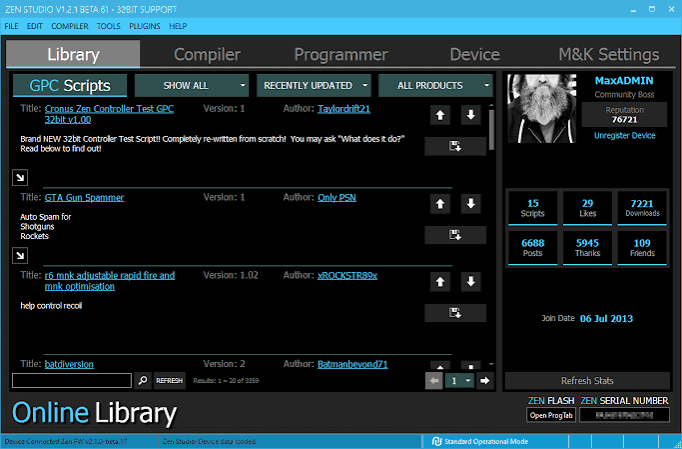
Cronus Zen scripts have become a popular topic among gaming enthusiasts who want to customize and automate certain controller functions. The Cronus Zen is a gaming cronus zen scripts adapter designed to provide additional controller customization and compatibility across different gaming platforms. Scripts can expand these capabilities by allowing users to configure specific button actions, create custom controller behaviors, and personalize their gaming experience.
Understanding what Cronus Zen scripts are, how they work, and where they can be useful is important for anyone interested in controller customization. This article provides an overview of the technology, common script features, responsible usage, and important considerations for gamers.
What Are Cronus Zen Scripts?
Cronus Zen scripts are small programs designed to work with the Cronus Zen device. They are generally written using the GPC scripting language, which is designed specifically for controller-related customization.
A script can tell the device how to respond when a player presses certain buttons or performs particular actions. Instead of relying only on the default controller configuration, users can create customized behaviors that match their preferred setup.
For example, a script might allow a player to remap buttons, create custom input combinations, or automate repetitive controller actions. These features can be particularly useful for accessibility, training, experimentation, and personal controller configuration.
How Cronus Zen Scripts Work
The Cronus Zen sits between a compatible controller and gaming system. When a player provides an input, the device can process that input according to the selected configuration or script before sending the resulting command to the console or computer.
The basic process involves three stages:
- The player presses a controller button or moves an analog stick.
- The Cronus Zen processes the input according to its programmed configuration.
- The resulting input is sent to the connected gaming platform.
This provides users with an additional layer of customization. Instead of changing settings individually within every game, certain controller behaviors can be managed through the device.
Common Features of Cronus Zen Scripts
Different scripts can offer different functions depending on how they are designed. Some common categories include controller remapping, input customization, and accessibility-oriented configurations.
Button Remapping
Button remapping is one of the simplest and most useful applications. A script can change which button performs a particular action. This can help players create a layout that feels more comfortable or accessible.
Custom Input Combinations
Scripts can also recognize combinations of button presses and trigger predefined actions. This can be useful for players who want to simplify complicated input sequences.
Adjustable Settings
Some scripts provide configurable options. Users may be able to change values through the Cronus Zen interface or controller inputs, depending on the script’s design.
Accessibility
Controller customization can be valuable for gamers who have difficulty using standard control layouts. Customized inputs can potentially make certain games easier to operate without requiring a completely different controller.
Why Gamers Use Cronus Zen Scripts
There are several reasons people explore Cronus Zen scripts. One major reason is personalization. Different players have different preferences, and standard controller layouts may not work equally well for everyone.
Competitive players may also be interested in controller customization because they want their controls to feel consistent across different games. Meanwhile, casual players may simply enjoy experimenting with different configurations.
Another benefit is convenience. A well-designed configuration can reduce repetitive controller adjustments and allow users to quickly switch between preferred setups.
Understanding GPC Scripting
Cronus Zen scripts commonly use GPC, a scripting language created for controller programming. GPC provides commands and structures that allow developers to detect controller inputs and define specific responses.
Learning basic scripting concepts can help users understand how controller configurations work. Variables, conditions, loops, and button-event logic are examples of programming concepts that may appear in controller scripts.
For beginners, starting with simple button-remapping projects can be easier than immediately attempting complex configurations. This approach helps users understand how individual inputs are processed.
Cronus Zen Scripts and Different Games
Compatibility and behavior can vary between games. A configuration designed around one game’s controls may not work appropriately in another because different games use different button layouts, input systems, and mechanics.
Players should therefore test configurations carefully before relying on them. It is also important to check whether a particular game or platform allows the use of controller adapters and custom input configurations.
Game developers and tournament organizers can have their own rules regarding external devices and automation. Players should always review the applicable rules before using customized controller configurations in competitive environments.
Fair Play and Responsible Use
One of the most important considerations surrounding Cronus Zen scripts is fair play. Some scripts may provide functions that could offer advantages in online multiplayer games. Whether a particular feature is permitted depends on the game’s rules, platform policies, and competition regulations.
Players should avoid using configurations that violate the terms of service or competitive rules of a game. In organized tournaments, external controller devices may be restricted or completely prohibited.
Responsible use means understanding the rules before using a script and choosing configurations that support legitimate customization rather than attempting to gain an unfair advantage.
Choosing and Testing a Script
When evaluating a Cronus Zen script, users should consider its purpose, compatibility, reliability, and configuration options.
A good script should have a clear explanation of what it does. Users should also understand which controller and platform combinations it supports.
Testing is another important step. A configuration should be checked in an appropriate environment before being used during an important gaming session. If a script causes unexpected button behavior, sensitivity problems, or inconsistent inputs, it should be disabled and reviewed.
Keeping backups of working configurations can also make it easier to return to a familiar setup after experimenting with new options.
Learning to Create Custom Scripts
For users interested in programming, creating their own Cronus Zen scripts can be an interesting technical project. Beginners can start by learning how controller buttons are represented and how basic input conditions work.
A simple learning path might include:
- Understanding basic GPC syntax
- Learning controller input functions
- Creating simple button remapping
- Working with variables
- Adding configuration options
- Testing individual functions
- Combining simple features into a larger configuration
Building scripts gradually can make troubleshooting easier and provide a better understanding of how controller programming works.
Important Compatibility Considerations
Before using Cronus Zen scripts, users should verify compatibility with their specific controller, console, operating system, and game. Firmware and software versions can also affect how a configuration behaves.
Controller manufacturers and gaming platforms may change their systems over time, which can affect third-party hardware compatibility. For this reason, users should rely on current documentation and official compatibility information when setting up their equipment.
It is also wise to keep firmware and associated software updated when appropriate, while checking release information before making changes to an established setup.
Conclusion
Cronus Zen scripts provide a flexible way to customize controller behavior and experiment with different gaming configurations. From basic button remapping to more advanced programmable input systems, scripting can give users greater control over how their controllers operate.
However, customization should always be balanced with compatibility, reliability, accessibility, and fair-play considerations. Players should understand the rules of the games and platforms they use and avoid configurations that violate competitive policies.
For people interested in learning about controller programming, Cronus Zen scripts can also serve as an introduction to practical scripting concepts. By starting with simple configurations and gradually learning how GPC works, users can better understand the technology behind programmable controller setups.